How to Pick a CTR Tool After CTR Sprout: Key Factors
Switching CTR tools means rebuilding campaigns from scratch, and many platforms make that harder than it should be. If you are leaving CTR Sprout, you need proof that each visit happened and a clear way to control desktop versus mobile traffic before you commit.
This article breaks down the factors that separate a workable CTR tool from a frustrating one: screenshot verification, keyword and location targeting, platform coverage across Google, Bing, Maps and AI Overviews, and how credit-based pricing maps to actual visits. By the end, you will know whether CTRTool fits your campaigns.
What Is CTRTool? Campaign Types, Platforms and Who It Serves
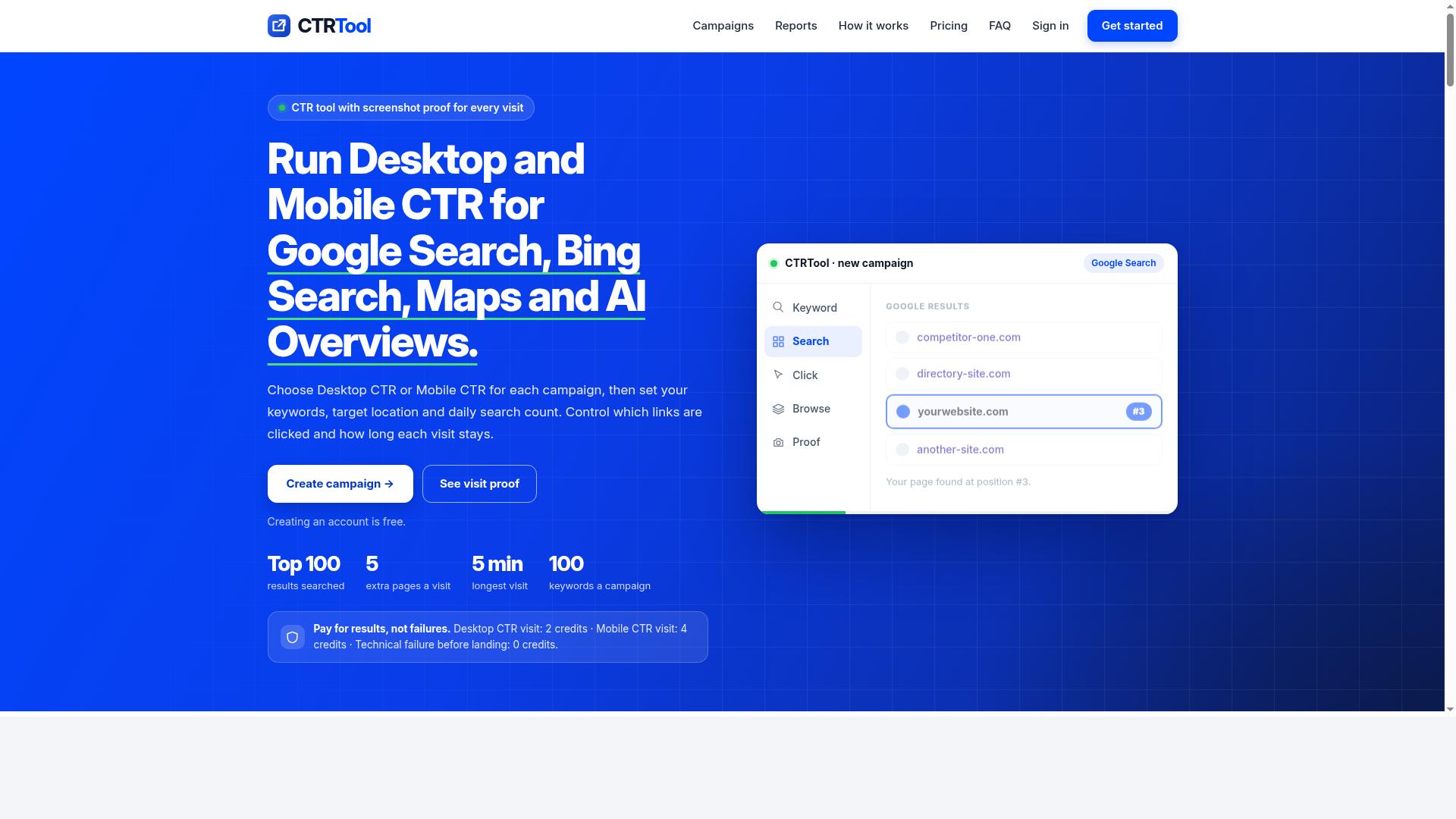
CTRTool is a SaaS platform that runs click-through-rate campaigns designed to lift organic CTR on Google Search, Bing Search, Google Maps, and AI Overviews. The core idea is straightforward: it simulates organic clicks on your results so search engines see stronger engagement signals for the keywords and pages you care about.
Each campaign is built around a specific surface, which matters because organic CTR behaves differently across a standard SERP, a local pack, and an AI-generated answer. CTRTool splits its offering into four distinct campaign types so targeting stays precise.
- Google Search CTR: the campaign searches a keyword and clicks the organic result, working across the Top 100 results and including internal pages.
- Bing Search CTR: the same keyword-and-click model applied to Bing, useful for covering a second search engine with one workflow.
- Google Maps CTR: the campaign finds a business listing and clicks its website link, covering up to 50 listings with city targeting.
- AI Overview CTR: the campaign finds your site in the AI overview and clicks its source link, which requires a matching AI citation to work.
Every campaign can run as Desktop or Mobile, and delivery happens through Desktop Chrome windows and real Android phone sessions matched to the target location via managed proxy routes. That device split matters for CTR analysis, because device-level CTR and position-adjusted CTR often tell very different stories.
CTRTool is built for SEO practitioners and agencies managing their own sites or client sites. Teams running keyword-level, page-level, and query-level CTR tracking across multiple properties fit the tool's structure well, and the platform provides screenshot proof for every visit so results can be shown to a client rather than taken on trust.
Campaign setup supports up to 100 keywords per campaign, country, state, and city targeting (or Any country), and a search depth up to 100. Daily search counts can run now, spread out, or with gaps across chosen days, hours, and a time zone, with daily goals resetting at 00:00 UTC. You also set the target URL, internal page URLs, link text, click order, scrolling time, up to five additional pages per visit, and visits up to five minutes total.
Reporting closes the loop on CTR tracking. Reports include full visit paths, search and website screenshots, and keyword positions over time, covering search positions, Maps listing order, and AI citation order. For anyone moving from CTR Sprout and weighing a new CTR tool, this combination of surface coverage, device realism, and documented proof is the foundation the rest of the evaluation should be built on.
Why CTRTool Is a Strong Choice After CTR Sprout
For teams moving on from CTR Sprout, CTRTool stands out by combining multi-platform campaign support with verifiable visit proof and granular control. It is built as a CTR tool with screenshot proof for every visit, covering Google Search, Bing Search, Maps and AI Overviews.
That breadth matters after CTR Sprout because a replacement tool should not narrow your options. CTRTool's positioning is simple: run CTR campaigns across four surfaces and back every visit with evidence you can review.
The comparison below focuses on practical selection factors, from coverage to reporting, so you can judge whether CTRTool fits how your team actually runs campaigns.
The Key Factors That Decide a CTR Tool Pick
When evaluating a CTR tool after CTR Sprout, focus on five practical factors: platform coverage, visit verification, campaign controls, pricing transparency, and reporting depth. Score each tool against them before you commit.
Platform coverage determines where your campaigns can run. Check whether the tool supports Google, Bing, Maps, and AI Overviews. A tool that covers only one search engine limits your CTR optimization to a fraction of the SERPs your audience uses.
Visit verification is the credibility test. Ask whether screenshots are provided for every visit, and whether search screenshots and landing screenshots are captured separately. Separate evidence lets you confirm both the query and the page that received the click.
Campaign controls shape how precisely you can target. Can you choose Desktop or Mobile per campaign, set location down to the city level, and define the visit path? Granular settings separate serious CTR tracking from blunt traffic delivery.
Pricing transparency protects your budget. Credits should map clearly to visit types, for example Desktop versus Mobile, so you can forecast spend before launching a campaign. Vague credit systems make CTR forecasting unreliable.
Reporting depth shows whether the tool supports real CTR analysis. Look for keyword positions tracked over time and full visit paths in the CTR dashboard. These CTR metrics help you connect click volume to ranking movement.
The most reliable approach is to score every candidate on a simple scale, one point per factor met, and compare totals side by side. A tool that scores well across all five is far easier to justify than one that excels in a single area.
Proof and Verification: Screenshot Evidence for Every Visit
CTRTool provides screenshot proof for every campaign visit, capturing both the search results page and the landing page as separate images. This is the core trust mechanism that separates a verifiable CTR tool from one that simply reports numbers.
After each visit, users receive two distinct proof images. The search screenshot shows the query that was used, the position the listing appeared in, and the click itself. The landing screenshot shows the target page fully loaded, confirming the visit actually reached its destination.
The key detail is coverage. Proof is automatic for every visit, not sampled. You are not reviewing a random subset of activity and hoping it represents the whole campaign. Every single visit carries its own evidence trail, so CTR auditing becomes a matter of checking images against expectations rather than trusting a summary report.
Beyond the two screenshots, CTRTool logs full visit paths. Campaigns support visits of up to 5 minutes with up to 5 additional internal pages, which gives the recorded path real depth.
- Entry keyword that triggered the visit
- Landing page load confirmation
- Internal page navigation when configured
This matters for CTR analysis because context shapes click-through rate. A visit that lands on a SERP crowded with featured snippets, a local pack, or AI overviews faces different zero-click pressure than a clean results page. Having SERP features logged alongside the visit lets you interpret keyword-level CTR and position-adjusted CTR with that context in hand.
Verification does not stop at the single visit. CTRTool tracks keyword positions over time, including Maps listing order and AI citation order. That turns the tool from a one-off click generator into a CTR tracking layer that shows how visibility shifts across the campaign lifecycle.
Position history supports better CTR benchmarking and CTR forecasting. If a keyword moves up or down, or its Maps or AI citation placement changes, you can connect that movement to changes in organic CTR and click volume rather than guessing at causes.
The proof model also connects to how credits work. CTRTool uses a pay-for-results credit model with no credits charged for technical failures before landing, and visits that cannot verify the requested location use no credits. In other words, the same verification discipline that produces screenshots also governs billing, which is a strong signal of a legitimate CTR tool rather than a scam.
Campaign Control: Desktop vs Mobile, Keywords, Location and Visit Paths
CTRTool gives users granular control over each campaign, starting with a choice between Desktop CTR and Mobile CTR. That decision matters because it determines the click simulation method used for the campaign. Device-level CTR behaves differently, so matching the simulation to the device you want to influence keeps your CTR tracking aligned with real user behavior.
The platform runs campaigns across Google Search, Bing Search, Maps and AI Overviews. Each campaign type exposes its own control set, so the options you configure depend on where you want your CTR optimization to land. Screenshot proof is captured for every visit, giving you a record you can review during CTR auditing.
Search campaigns are built around the query itself. You specify the keywords you want to target and the target URL, which can be an internal page rather than only your homepage. This lets you direct click volume toward the pages that carry your most important head terms, long-tail queries, or commercial landing content.
Location control works at three levels: country, plus optional state and city. Alternatively, you can choose Any country to spread activity across a mixed geography. For local businesses, this means you can concentrate search impressions and clicks in the markets you actually serve, which keeps your CTR segmentation meaningful instead of diluted by irrelevant regions.
Maps campaigns work differently from search. Instead of a keyword and URL pairing, you target a business listing and a location. That structure fits local pack visibility, where the knowledge panel and map results carry much of the click-through rate for nearby searchers.
AI Overview campaigns carry their own requirement: a matching AI citation is needed. Because AI overviews increasingly absorb clicks and drive zero-click searches, this control lets you focus activity where your content already appears as a cited source rather than guessing at eligibility.
Visit paths add a layer beyond the landing click. Users can define a sequence of internal pages to visit after arrival, simulating deeper engagement rather than a single bounce. You also control which links are clicked and how long each visit stays, so session behavior can reflect realistic reading time.
Campaigns can target the top 100 organic results, and you set the daily search count per campaign. Together these controls support more credible CTR reporting and cleaner keyword-level CTR analysis. CTRTool is transparent about limits, stating plainly that automated visits do not guarantee rankings, so treat these settings as tools for testing and CTR uplift experiments, not a substitute for sound SEO.
Platform Coverage: Google Search, Bing, Maps and AI Overviews
CTRTool supports four distinct platforms: Google Search, Bing Search, Google Maps, and AI Overviews, each with tailored campaign mechanics. This multi-platform scope matters because modern SERPs are no longer just ten blue links. Featured snippets, local packs, knowledge panels, and AI overviews all compete for the same click, so a CTR tool that only handles one surface leaves gaps in your CTR optimization.
Before comparing mechanics, it helps to understand what each platform is actually simulating. The goal across all four is to influence organic CTR by generating real click behavior on the results you want to lift. Each platform has its own rules for what counts as a valid interaction, and those rules shape how you build a campaign.
Google Search campaigns work by clicking organic results for a chosen keyword. You can run them on Desktop or Mobile, and the tool can target up to the top 100 results for that query. Campaigns can also point at internal pages rather than only the home page, which is useful when you want page-level CTR movement on a specific URL instead of a broad domain signal.
The top 100 results ceiling is generous enough to reach deep positions. That makes it practical to support long-tail queries where your listing sits well below the first page, as well as head terms where you are already visible.
Bing Search follows the same mechanics as Google, just on Bing's index. You select a keyword, choose a device, and the campaign clicks organic results within the same top 100 range. Because Bing carries a different audience and often less competitive SERPs, running both engines gives you a broader read on CTR variance across search platforms rather than a single-engine snapshot.
For teams tracking query-level CTR by engine, this parallel structure keeps reporting consistent. You compare like with like instead of juggling different campaign models.
Google Maps campaigns focus on local discovery. The tool finds your business listing and checks up to 50 listings, roughly five pages of map results, before clicking through to the listing itself. This is the mechanic that supports the local pack, where map visibility often decides whether a nearby searcher ever reaches your site.
If your business depends on foot traffic or "near me" searches, Maps coverage is not optional. It lets you address local pack presence directly instead of treating local results as a side effect of organic rankings.
AI Overviews campaigns require a matching AI citation. The click is placed on the citation link inside the overview, so your page needs to be referenced there first. This is the newest surface and the one most tied to zero-click searches, where the answer appears before any traditional result.
Because AI overviews only credit cited sources, this platform rewards pages already earning citations. It gives you a way to measure and encourage clicks on that citation rather than guessing at its impact.
All four campaign types share the same location logic. You can target a chosen country and optionally narrow to a state and city, or select Any country to use a mix of supported locations. There are no country restrictions stated, which suits a global online service and teams running CTR segmentation across markets.
Location targeting also keeps your CTR benchmark comparisons honest. A campaign aimed at one city should not be judged against nationwide averages, and the country, state, and city layers let you keep those reads separate.
Put together, this coverage lets you address the SERP features that shape click-through rate today. Featured snippets and rich results live in Google Search, local packs live in Maps, and AI overviews sit above both. A tool that spans all four gives you a fuller CTR dashboard view instead of a partial one.
When you evaluate a CTR tool after CTR Sprout, check whether it covers each surface you actually compete on. If your niche leans local, Maps matters most. If you chase informational queries, AI overviews and featured snippets deserve priority. CTRTool's four-platform model lets you match campaigns to the features driving your search impressions, which is the practical test of platform coverage.
Pricing and Plans: A Pay-for-Results Credit Model
CTRTool uses a credit-based pricing model with monthly plans, where credits are consumed per visit and costs vary by device type. Plans are billed monthly in USD, and each credit maps directly to a visit, so your spend tracks the campaign volume you actually run.
Because Desktop and Mobile visits consume different credit amounts, the effective cost per visit depends on your campaign type. A mobile-heavy campaign will draw down credits faster than a desktop-focused one at the same visit count.
This model suits teams that want a clear link between budget and results. Before comparing tiers, it helps to understand how the credit math works, since that is what determines which plan fits your CTR tracking and CTR optimization goals.
How Credits Map to Desktop and Mobile Visits
In CTRTool's credit system, a Desktop CTR visit costs 2 credits and a Mobile CTR visit costs 4 credits, so mobile campaigns draw down credits faster at the same visit count.
The plans scale with your volume:
- Starter: $59/month for 2,000 credits, up to 1,000 Desktop CTR visits or 500 Mobile CTR visits
- Growth: $125/month for 5,000 credits, up to 2,500 Desktop or 1,250 Mobile visits, marked Recommended
- Scale: $399/month for 20,000 credits, up to 10,000 Desktop or 5,000 Mobile visits
- Agency: $699/month for 40,000 credits, up to 20,000 Desktop or 10,000 Mobile visits
The core math is simple: credits = visits × device multiplier. The multiplier is 2 for Desktop and 4 for Mobile. A campaign mixing 500 Desktop and 250 Mobile visits would use 1,000 + 1,000 = 2,000 credits.
Two details matter for planning. First, unused credits roll over while your subscription is active but expire when cancellation takes effect, so credits are not a permanent bank. Second, a verified search without a match costs 1 credit and a technical failure before landing costs 0 credits.
Estimate your visit volume and device mix before choosing a plan. If your campaigns lean mobile for device-level CTR analysis, budget roughly double the credits per visit compared with desktop work. Creating an account is free, which lets you review the model before committing.
Trust Signals: Eligibility Rules, Billing Fairness and Support
CTRTool builds trust through clear eligibility rules, fair billing practices, and accessible support channels. When you compare a CTR tool after CTR Sprout, these signals matter because CTR optimization depends on verifiable, honest interactions with search results. A tool that explains its rules upfront is easier to rely on for CTR tracking and CTR reporting.
The eligibility rules are the foundation of that trust. CTRTool requires the target page to appear within the top 100 organic results for the chosen keyword and location. This keeps campaigns grounded in real search impressions rather than arbitrary targets.
Different campaign types carry their own checks:
- Maps campaigns check up to 50 listings, roughly five pages of local results.
- AI Overview campaigns need a matching source link before a visit qualifies.
These rules help keep CTR analysis honest, since every campaign ties back to a keyword and location where the page genuinely ranks. For anyone running keyword-level CTR or page-level CTR work, that clarity makes CTR auditing far simpler.
Billing fairness is the second pillar. Credits are consumed only for successful visits with screenshot proof. Failed or unverified visits are not charged, which removes much of the risk that plagues CTR optimization budgets.
This approach supports cleaner CTR metrics. You pay for what actually happened, not for attempted clicks. That distinction matters when you build a CTR dashboard or run CTR segmentation across brand queries and non-brand queries.
CTRTool also sets expectations plainly. It explicitly does not guarantee higher rankings, leads or sales. That honesty is a strong trust signal, because it frames the tool as a CTR tracking and CTR uplift aid rather than a rankings shortcut.
Support and legal transparency round out the picture. CTRTool offers email support at vaibhav@autoblogging.ai, giving users a direct line for questions about campaigns or billing.
The site also publishes dedicated pages for support, terms of use, and legal notices. A copyright notice reading © 2026 CTRTool appears on the site, along with a link to a licenses page.
The legal notices page is specific about data sources. It states that country, state and city records come from CountryStateCity via the @countrystatecity/countries 2.0.0 package, under the Open Database License 1.0 and Database Contents License 1.0.
For a CTR tool, this level of disclosure is uncommon and reassuring. Clear eligibility, proof-based billing, and open support details make CTRTool a credible choice for teams serious about SERP CTR work after CTR Sprout.
Who Should Use CTRTool
CTRTool is designed for SEO practitioners and agencies who need to influence organic CTR across multiple search platforms and require verifiable proof of visits. It is built around a specific audience: professionals running CTR campaigns for their own websites or for client properties, on platforms that include Google Search, Bing Search, Google Maps, and AI Overviews.
That focus shapes who gets the most value from the tool. It is not a general-purpose rank tracker or a broad SEO suite. It is a campaign tool for teams that treat organic CTR as a measurable lever and want evidence they can show to a client or stakeholder.
The site's own guidance mentions tier links, PBNs, and test properties, which signals the kind of practitioner the product is aimed at. If your work involves running structured click campaigns across multiple properties, the sections below explain where CTRTool fits.
SEO professionals managing client sites. Consultants and freelancers often need to show progress on keywords where rankings have plateaued. A CTR tool gives them a way to work on click-through rate at the keyword level without waiting on ranking movement alone.
In-house SEO teams. Teams responsible for a single brand or a small portfolio can use CTRTool to support device-specific and location-specific strategies. The ability to run Desktop and Mobile campaigns separately matters when mobile and desktop SERPs behave very differently.
Agencies running campaigns for multiple properties. Agencies juggling several clients need a repeatable process and clear reporting. CTRTool's support for country and city targeting makes it usable for global clients with regional priorities, where a single national campaign would be too blunt.
In short, the tool suits practitioners who already understand search campaigns and want a dedicated environment for running them, rather than someone looking for a first introduction to SEO.
CTRTool supports a range of practical use cases across the campaign lifecycle. The most common ones map to the questions clients and stakeholders actually ask.
- Improving CTR for target keywords where impressions are healthy but clicks are lagging.
- Testing SERP feature impact, including how featured snippets, rich results, and AI overviews affect click behavior.
- Tracking position changes alongside CTR movement so you can separate ranking effects from click effects.
- Demonstrating ROI with screenshot evidence, which turns a claim about CTR uplift into something a client can review.
That last point is often the deciding factor. CTR work is easy to describe and hard to prove. Screenshot evidence of visits gives an agency or in-house team a concrete artifact for reporting, rather than a dashboard number nobody can verify.
Because campaigns can be split by device, teams can also run device-level CTR analysis and adjust strategy per platform. Country and city targeting extends the same logic to geography.
CTRTool is built to accommodate very different experience levels, which is unusual for a campaign tool. Beginners can start with simple search campaigns and learn the mechanics before adding complexity.
More advanced users can move on to visit paths and AI Overview campaigns, which support deeper strategies around how users move through a site and how AI-generated results shape click behavior. That progression means a junior team member and a senior strategist can work in the same tool without one holding the other back.
For agencies, this matters for onboarding. New staff can be productive on basic campaigns quickly, while senior practitioners handle the more involved setups. The tool grows with the team rather than forcing an early choice between simplicity and depth.
Advanced users also benefit from the multi-platform coverage, running coordinated work across Google Search, Bing Search, Google Maps, and AI Overviews instead of treating each surface as a separate project.
The audience description is specific, and clarity about fit is more useful than a broad claim. CTRTool is a strong match for SEO practitioners and agencies running CTR campaigns for their own or client websites. It is less relevant for teams that do not run click campaigns at all, or that need a full technical SEO audit suite.
If your work involves organic CTR as an active lever, multiple properties, and a need to prove results, the tool is built for you. If you are weighing it against CTR Sprout, the audience fit is a sensible first checkpoint before comparing features and reporting.
The practical takeaway is straightforward. Match the tool to the job: campaign-driven CTR work across search platforms is exactly the job CTRTool was designed to do.
Final Verdict: Is CTRTool the Right CTR Tool for You?
CTRTool is a strong fit for teams that prioritize verifiable visit proof, multi-platform coverage, and granular campaign controls, especially those transitioning from CTR Sprout. The platform is built around a simple promise: every visit can be backed by a screenshot, so CTR tracking stops being a matter of trust and becomes a matter of evidence.
That focus on proof separates it from tools that report clicks without showing where they landed. For anyone running CTR optimization campaigns where accountability matters, the screenshot record is the headline feature.
Here is a quick summary of where CTRTool stands out and where it asks more of you:
- Screenshot proof for every visit, giving you a documented record for each campaign run.
- Support for Google, Bing, Maps, and AI Overviews, so your SERP CTR work is not confined to one search engine.
- Desktop and Mobile choice, letting you match device-level targeting to how your audience actually searches.
- Location targeting, useful for campaigns where geography shapes demand.
- Credit-based pricing, so spend scales with the volume of visits you run rather than a flat subscription.
Two limitations deserve an honest mention. First, there is no phone support. The support channel listed in the FAQ is email, so teams that rely on live calls should plan around that.
Second, campaigns require a top-100 ranking. If your target pages sit outside the top 100 for their keywords, CTRTool is not the right environment for those pages, regardless of how good the rest of the feature set looks.
Weigh those points against your own workflow. A team with well-ranked pages and a preference for written support will find little friction. A team with lots of low-ranking pages, or one that needs a voice on the line during a campaign, should look at alternatives.
So who should choose CTRTool? If you need proof and platform breadth, the combination is hard to match. Screenshot evidence, coverage across four surfaces, and device and location controls give you a campaign setup that is easy to audit later.
If phone support is a firm requirement, or a meaningful share of your pages rank outside the top 100, consider other options first. The tool is not trying to be everything to everyone, and that clarity is a strength rather than a weakness.
For questions before you commit, the support email listed in the FAQ is vaibhav@autoblogging.ai. There is no phone number, physical address, or stated opening hours, so email is the channel to use.
Product details and account access are available at ctrtool.com, where you will find pages for signing in, creating an account, support, terms of use, and legal notices. Reviewing the terms and legal notices first is a sensible step before starting a campaign.
On balance, CTRTool earns a clear recommendation for teams that value documented visits and multi-platform reach over live phone contact.
Frequently Asked Questions
What should I look for in a CTR tool if I'm switching from CTR Sprout?
Focus on the factors that affect campaign quality and accountability: which surfaces are supported (Google Search, Bing Search, Maps, AI Overviews), whether Desktop and Mobile campaigns can be run separately, and whether you get verifiable proof of each visit. CTRTool is built around screenshot proof for every visit, with search and landing screenshots provided as separate proof images, so you can audit results rather than take them on trust.
How does CTRTool's screenshot proof work, and why does it matter when comparing tools?
CTRTool provides screenshot proof for every visit, along with full visit paths, so you can see what actually happened during a campaign rather than relying on aggregate reports. This matters when evaluating any CTR tool, because proof lets you verify that visits occurred for your chosen keywords and locations. Ask any prospective tool to show exactly what evidence you'll receive per visit before committing.
Can I run separate Desktop and Mobile CTR campaigns, and which platforms are covered?
Yes. With CTRTool you choose Desktop CTR or Mobile CTR per campaign, and campaigns can run on Google Search, Bing Search, Maps and AI Overviews. You set your keywords and target location for each campaign, with the option to target a country plus an optional state and city, or select "Any country" to use a mix of supported locations.
How does CTRTool's pricing and credit system compare to other CTR tools?
CTRTool uses monthly plans priced in USD with pay-for-results credits: Starter is $59/month for 2,000 credits (up to 1,000 Desktop CTR visits or 500 Mobile CTR visits), and Growth is $125/month for 5,000 credits (up to 2,500 Desktop or 1,250 Mobile visits). When comparing other tools, check how their credits map to actual Desktop versus Mobile visits, since Mobile visits typically consume more credits. Always confirm current pricing directly with any provider, as plans can change.
What eligibility rules should I check before choosing a tool?
Make sure the tool's requirements match your keywords and targets. With CTRTool, your page must appear within the top 100 organic results for the chosen keyword and location, Maps campaigns check up to 50 listings (about five pages), and AI Overview campaigns require a matching source link. Confirming these rules upfront avoids wasted credits and failed campaigns.
Does CTRTool track keyword positions over time, and who is it designed for?
CTRTool tracks keyword positions over time, including Maps listing order and AI citation order, so you can monitor movement alongside your campaigns. It's aimed at SEO practitioners and agencies running CTR campaigns for their own or client websites across Google Search, Bing Search, Google Maps and AI Overviews. If you have questions before signing up, you can reach support at vaibhav@autoblogging.ai.